Tampilkan postingan dengan label Android. Tampilkan semua postingan

Best Apps To Make Free Calls On Android

Posted by Unknown Sabtu, 30 November 2013 0 komentar
Apps are helping you save money and time in every way possible.You can find different apps for specific work and these days mostly used apps are free voice and video calling apps. Many apps available in app store but which one is best for a specific task is difficult to choose so I have done some research and come out with best apps for free calling on Android. 


1. Skype - Free Calling apps list incomplete without including Skype. Skype one of the oldest and famous app providing free calling facility. It's available for mobile OS like Android, iOS as well as computer platform like Windows, Mac, Linux. Other than free calling(Voice & Video), it provides file sharing, sending messages, etc.

Skype

2.  Viber - If you are android geek than this app will definitely be in your smart phone. Simple and straightforward download and install it, your ID will be your phone number and connect with other viber users via free calling, sending messages, email, location sharing, etc. 


Viber

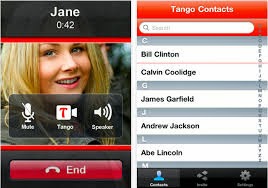
3. Tango - Tango also a free voice and video calling app like many other apps. This app available for Android, iOS operating system, tablets and PCs. It's popularity can imagine with stats that, 150M people around the world using Tango. Its an easy to use, Fun to use and free to use application group chat up to 50 friends.


Tango

4. Kakao Talk - Kakal Talk app available for almost every mobile platform – Android, iOS, Blackberry, Windows. It allows free voice & video calling, messaging, sharing multimedia content, etc. This app added a little bit of fun by including in built game and some voice filters other than this it also acts as a reminder for scheduling gatherings and appointments.


Kakao Talk

5. ooVoo - ooVoo, another name in the list of free voice & video calling and instant messaging. This app has simple interface and cross platform availability and like other apps also provide calling, messaging and file sharing facility for free.

ooVoo
Among many Android Apps, these are some best apps for instant sharing and free calling. For services regarding android apps visit here.

Baca Selengkapnya ....

YotaPhone dual-screen smartphone 'to launch before Christmas'

Posted by Unknown Senin, 18 November 2013 0 komentar

YotaPhone, the dual-screen mobile device that made a splash at this year's Consumer Electronics Show, will reportedly launch internationally before Christmas.


The YotaPhone has an 4.3-inch HD LCD display on the front and an e-ink display on the back. The idea is that you can use the colour LCD display like a normal Android phone, and receive notifications, read news or send maps to the rear e-paper display to save battery.
The YotaPhone is made by Russian smartphone manufacturer Yota, which also provides mobile broadband services in the country. The YotaPhone won the CNET Best of CES Award for 'Hottest Mobile Device' at the 2013 International Consumer Electronics Show.
At the time, the device featured 4G LTE, Android 4.1, a 4.3-inch 1280p HD display, a 12-megapixel camera, and a 1.5GHz dual-core Snapdragon S4 Plus (MSM8960) chip. However, it is likely that at least some of these specs will be updated ahead of the launch, which TechCrunch reports will be before Christmas.
The YotaPhone is not the first dual-screen smartphone – earlier this year Samsung launched ‘the Hennessy’, a dual-screen flip phone with a touch-screen on both the outer and inner surfaces. However, it is the first to combine an LCD screen with an e-ink display.
Yota Devices chief executive Vlad Martynov claims that the YotaPhone represents "a whole new archetype in smartphones". As well as saving battery, the e-ink display also provides a more comfortable reading experience and lets users view notifications without having to activate their phone.
Reports in the Russian press suggest that the YotaPhone will ship with a price tag of 20,000 rubles (roughly £380), but the company has so far made no announcements on pricing.

 Product Specifications

OS Android Jelly Bean 4.2.2
CPU Dual Core 1.7 GHz Krait
FORM FACTOR Monoblock touch with front and back screens
DIMENSIONS 133.6 x 67 x 9.99mm
WEIGHT 146g
COLOURS Black and white
MAIN SCREEN 4.3” 720x1280 LCD, 16.7M colours; capacitive multi touch
BACK SCREEN 4.3” 360x640 EPD, 16 grayscale; capacitive touch zone below the EPD for gesture controls
NETWORK LTE 800/1800/2600 MHz, UMTS 900/1800/2100 MHz, GSM 900/1800/1900 MHz
CAMERA Main camera 13 MP AF, LED flash, front camera 1MP
MEMORY 2GB RAM, 32GB eMMC
CONNECTIVITY WiFi 802.11 a/b/g/n, BT v4.0, GPS w/A-GPS + Glonass
VIDEO 1080p 30fps; H.263, H.264 AVC, MPEG-4, WebM
AUDIO MP3, AAC, eAAC, eAAC+, AMR, MIDI, WAV
BATTERY 1800mAh
OTHER Accelerometer, compass, gyroscope, proximity sensor, ambient light sensor, FM radio, micro-SIM, special YotaPhone gestures and Put2Back applications for the back screen


Source : The Telegraph

Baca Selengkapnya ....

Samsung 'plans Galaxy phone with wrap-around display'

Posted by Unknown Minggu, 17 November 2013 0 komentar

Samsung is reportedly planning to release a Galaxy smartphone next year with a three-sided display that wraps around the edges of the device.


The phone will use an upgraded version of Samsung’s technology called Youm, currently featured in the curved Galaxy Round handset, two people familiar with the plans told Bloomberg.
The idea is that the user will be able to read messages from an angle. However, Samsung plans to have each side of the display operate independently, according to the report.
Samsung does not have a specific release date for the new device, but one person said the handset is likely to come out during the second half of next year.
Samsung unveiled a prototype of its Youm flexible display technology at this year's Consumer Electronics Show (CES) in Las Vegas. Youm uses OLED display technology, and is designed to bring out better colours and contrast with an extremely thin form factor.
Brian Berkeley, the senior vice president of Samsung's display lab, showed off a prototype of a phone with a Youm display bent around the sides at CES. He said the technology will let the company's partners make bendable, rollable, and foldable displays
Then in October Samsung unveiled the Galaxy Round. Billed as the world's first curved screen smartphone, the device features a flexible 5.7-inch high definition display and is designed to allow users to check the information such as the date, time, battery life and missed calls more easily while the home screen is off.
The global flexible display industry is predicted to grow rapidly in the next few years. Research firm IHS Display estimates the market will be worth $1.5 billion (£900 million) by 2016 and more than $10 billion by 2019.
LG Electronics has also unveiled a curved smartphone called G Flex. The vertically curved design of its G Flex smartphone is optimised for the average face, to deliver improved voice and sound quality, according to LG.
.
Source : The Telegraph

Baca Selengkapnya ....

BBM update rolled out

Posted by Unknown 0 komentar

BlackBerry's messenger service receives upgrades for Android and iOS platforms


BlackBerry has announced a series of updates for its BlackBerry Messenger (BBM) service for iPhone and Android platforms that will be rolled out Friday, 15th November 2013.
BBM, which was downloaded more than 20 millions time in the week after its re-launch in October, has been upgraded to fix a series of glitches, as well to add new features.
For iOS, BBM will now support iPod and iPad devices, and an issue where some users would be missing BBM contact names has now been fixed, according to the company.
Some issues with language support have also been remedied.
For both platforms BlackBerry have launched a ‘tell your friends’ feature to help you connect using BBM’s sharing tools.
You will also be able to invite BBM contacts to BBM Groups by email, even if you do not know their PIN.
Specifically for Android, BlackBerry say they have addressed an issue where some users were experiencing very high battery use, as well as creating BBM contact categories.
BBM used to be exclusive to BlackBerry smartphones, but is now available as a free download in Google Play and the App Store.
Android smartphones must be running Ice Cream Sandwich and Jelly Bean (Android 4.x) and iPhones must be running iOS 6 and iOS 7.
Android and iPhone users who download the BBM app can carry out both one-on-one and group text chats, and share files such as photos and voice notes instantly.
Using the ‘Broadcast Message’ function they can also send messages to all of their BBM contacts in one go.
BBM is widely recognised as BlackBerry’s most prized asset apart from its corporate email, but its 80 million users are less than half the 200 million people who use WhatsApp across platforms.
Upon re-launching the service, Andrew Bocking, Executive Vice President of BBM, said: “It is great to see so many people downloading BBM, but the true measurement for us is engagement – the connections being made and the conversations in which our BBM community engages.
"The power of BBM has always been the active, real conversations and interaction that our customers enjoy.
“From here on out, we will focus on active users of BBM and will no longer focus on simple download numbers.”

Source : The Telegraph

Baca Selengkapnya ....

Latest Android Smartphone: NEXUS 5

Posted by Unknown Selasa, 12 November 2013 0 komentar

 
http://reviewtoprice.com/wp-content/uploads/2013/03/Nexus-5-Picture.jpg
Nexus 5

Google's latest smart phone running on Android's updated version Android 4.4 “Kitkat”, 5in Nexus 5 has been launched on 31 October 2013. Nexus 5 is only smart phone running on latest Android OS “Kitkat", which offers premium Android experience after inclusion of some new features. Google's latest smart phone Nexus 5 called Google intended smart phone as Google directly involved in creation of hardware and software also, with manufacturing partner LG.
Its 5-inch HD IPS plus LCD screen is great, sharp and clear gives extreme visual experience, Android 4.4 “Kitkat” refreshing experience along with brand new added features Google Now, New full screen view,integration of text messages into Google's Hangout chat app, Google-aware caller ID.


Specifications:

Processor: 2.3 GHz quad-core Qualcomm Snapdragon 800
RAM: 2GB
Screen: 5in full HD IPS Plus LCD
Storage: 16/32GB
Operating system: Android 4.4 "Kitkat"
Camera: 8MP rear and 1.3MP Front-facing camera
Weight: 130g
Price: £299 for 16GB and £339 for 32GB

For more information see video of Nexus 5 review below :


If you want to buy a smart phone with 5-inch screen, better camera and battery life or large storage capacity, Nexus 5 is best smart phone of Android to buy.

Baca Selengkapnya ....

New tablet eye control gadget unveiled at Techcrunch in Berlin

Posted by Unknown Jumat, 01 November 2013 0 komentar

Goodbye smeary fingerprints across your tablet screen, the eye-controlled tablet is now available for all.


According to Copenhagen-based company The Eye Tribe who make the clip-on gadget, it will soon be common place for all our currently touchscreen devices.
Connecting via a USB 3 connection, the Eye Tribe device hooks onto a tablet and instantly allows the user to control the functions using their eye movement.
"We can actually track exactly at what point on the screen you are looking. And we can do that very fast and very accurately," explained Sune Alstrup Johansen from The Eye Tribe, at this year's TechCrunch technology expo in Berlin.
While eye-tracking features are already standard on some devices, the technology is still far from commonplace.
Johansen says: "In five years, it will be in most of the mobile devices, and you will think back, how did we even, what was it like before."

Baca Selengkapnya ....

'Google's Android KitKat targets cheaper smartphones'

Posted by Unknown 0 komentar

Android 4.4 KitKat is catered towards wearable devices and cheaper phones, a source says


 Android 4.4 KitKat could be Google's latest attempt to make Android devices cheaper, according to leaked documents.

Google wants its new software to work well on low-end phones in addition to the more expensive Samsung Galaxy and HTC devices, according to blogger Amir Efrati who said he has seen confidential Google documents.

Efrati said the key improvement will be better memory management to allow "entry-level devices" to run with just 512MB of RAM.

Currently less than half of Android devices are running the latest version of the operating system which creates problems for app developers who rely on users having updated features.

The company also reportedly wants to improve the operating software to make it suitable for wearable computing.

The new version could include support for three new sensors: geomagnetic rotation vector, step detection and step counters, which could be Android's way of answering Apple's inclusion of a dedicated motion processor in its latest iPhone.

Efrati added that the update could also include power saving options with both sensor and WiFi batching to help improve battery life.

He also claimed the KitKat will include native support for a smartphone to become an infrared remote control, and to emulate payment cards that use near-field communication.

He said: "Google wants your Android device to be a remote control. The next version of Android lets developers build apps that control TVs, tuners, switches and other devices by sending infrared signals."

Source : The Telegrapgh

Baca Selengkapnya ....

Shoto photo app launches on Android and iOS

Posted by Unknown Rabu, 30 Oktober 2013 0 komentar

Shoto app lets you automatically share smartphone photos with friends


A new app is launching in the UK today that uses a combination of location and phonebook details to automatically create albums of all the photos taken together by a group of friends at a given place and time.
Known as Shoto, the aim of the app is to solve the problem of never getting to see the photos that other people have taken an event, like a wedding or a office party. However, it also includes privacy controls that let the user select which people at the event get to see their pictures.
When the user downloads Shoto, all of the photos on their phone are automatically organised into albums and backed-up in the cloud. Shoto looks at the user’s phonebook and the geotags on their photos and matches these albums with those from friends that were also present in the same location at the same time.
For example, if a group of friends all download Shoto, they will instantly have access to each other’s photos from an event they all attended together. However, this would only be the case if all of the people in the group had the other members saved in their phonebook.
If the user wants to share a photo album with someone who was not there – for example, an aunt who couldn't make it to her niece's wedding – Shoto allows the user to send an album with a note. However, when the album is shared, only the photos taken by the sender will show up.
“Shoto works out which of your real friends are with you, and automatically brings together your and their photos into a single set of smart albums, so that you can enjoy memories without having to nag, be nagged and without looking at your photos in a piecemeal manner.” says Sachin Dev Duggal, co-founder and 'chief wizard' at Shoto.
“We are entering a world of new dimensions and context; private is the new social, people want to have intimate conversations about real memories with their real friends. Shoto does exactly this – no manual process, no setup, just unparalleled ease and control.”
Users can control what others see by selecting “me,” “friends there,” or “world” using an simple circle gesture. This can be set at an app, album or photo level and control is instant, meaning that as the privacy setting are changed, photos appear or disappear from other people's phones.
The app includes machine-learning algorithms that build up an understanding of the user based on their historical photo-taking behaviour. Duggal has big plans to build on this intelligence to offer new services such as restaurant recommendations as the app develops.
Shoto was launched today at the Dublin Web Summit and is now available, for free, in the Apple App Store and via Google Play.

Source : The Telegraph

Baca Selengkapnya ....

Android Apps

Posted by Unknown Minggu, 27 Oktober 2013 0 komentar
Dear All,

Scan QR code to download the apps. More apps coming 


Whatsapp for Android

Link---->> Click Here

 BBM for Android


Link--->>Click Here

If you don't have a QR Code scanner, visit this link to download one.

Baca Selengkapnya ....

Custom ROM Ultimate Sonic untuk Galaxy Young

Posted by Unknown Minggu, 09 Desember 2012 0 komentar

Untuk postingan Android kali ini saya akan coba berbagi informasi mengenai cara custom ROM Samsung Galaxy Y atau cara custom ROM Samsung Galaxy Young GT-S5360. Memang banyak cara untuk mengganti custom ROM, Tapi kali ini saya hanya membahas tentang Custom ROM "Ultimate Sonic ROM V3"

Ultimate Sonic Rom v3 - Custom ROM Samsung Galaxy Y GT-S5360

Tutorial ini tidak jauh beda dengan custom ROM Samsung Galaxy Mini,karena sama-sama dikembangkan oleh anak Indonesia, thanks to kang Mumtaz asal kota Kembang, Bandung yang rela berbagi hasil olahan custom ROM-nya. Adapun nama custom ROM Samsung Galaxy Y ini adalah Ultimate Sonic ROM (USR). Hingga postingan ini diturunkan kang Evan telah merilis Ultimate Sonic ROM hingga versi 3 yang keseluruhannya diambil dari kernel Repencis dan telah diupdate dengan ICS black layout.

Features Ultimate Sonic Rom v3

  • New UI
  • Based Dxle1
  • Based icon from cm7steel blue
  • New lockscreen based lidroid rom
  • New kernel
  • Fast boot
  • Fast performance
  • Cyanogen vs ICS (Ice Cream Sandwich) inside
  • Crt off

Ultimate Sonic Rom v3 - Custom ROM Samsung Galaxy Y GT-S5360

  • Download terlebih dahulu CMW RecoveryCWM.zipROM Ultimate Sonic ROM v3 bisa ultimatesonicromv3.zip atauultimatesonicromv3.zip, kemudian download juga ICS Black version, icsblack.zip. File hasil download tadi simpan di SD Card anda letak diluar folder saja.
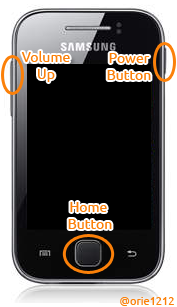
  • Boot melalui recovery mode, caranya tekan secara bersamaanPower + Volume (UP) + Home secara bersamaan, setelah masuk pilihlah apply update from sd card, pilih CWM.zip, tunggu beberapa saat dan reboot.
  • Selanjutnya boot melalui CMW Recovery caranya sama seperti recovery mode yakni menekan Power + Volume (UP) + Home secara bersamaan, pilih wipe data factory reset dan wipe cache partition.
  • Setelah selesai proses Wipe data dan wipe cache, selanjutnya install ROM Ultimate Sonic ROM dengan cara memilih instal zip from sdcard > choose zip from sdcard lalu pilihlahultimatesonicromv3.zip tunggu proses instalasi selesai danJANGAN DI REBOOT.
  • Masih di CMW Recovery selanjutnya masuk ke advanced pilihlahreboot recovery lalukan wipe data factory reset dan wipe cache partition, setelah selesai lalu di reboot.
  • Ketika hidup atau start up dan muncul logo Android-nya cepat matikan handphone anda.
  • Boot kembali melalui CMW Recovery, install update ICS Black version dengan cara instal zip from sdcard > choose zip from sdcard lalu pilihlah icsblack.zip tunggu proses instalasi selesai dan reboot.
  • Selamat karena anda sudah berhasil meng-custom ROM Samsung Galaxy Young anda dengan Ultimate Sonic Rom v3 sehingga sekarang device anda sudah berasa Ice Cream Sandwich (ICS).

Baca Selengkapnya ....

Cara Install Custom Rom Galaxy Young

Posted by Unknown 0 komentar
Hy Pengunjung Cyberdark Blog, gimana punya kabar, pastinya baik kan hehehehe, pada kesempatan kali ini saya akan mencoba menulis Step By Step Instal Custom Rom Di Galaxy Young,

* Upgrade Baseband/Firmware/Stock Rom
1. Download dan install driver: SAMSUNG_USB.rar
2. Download s5360-odin.rar | Mirror
3. Download firmware: S5360DDKK1_S5360ODDKJ3.rar (mutiple files) atau download dari sammobile.com  koleksi ada disini
.4. Download Totoro 0623.pit 
..
Setelah persiapan di atas dio download tinggal prakteknya saja : 
1. Pastikan baterai smartphone telah di charge PENUH atau minimal 90%
2. Matikan smartphone Galaxy Y (sampai benar-benar off — layar berwarna hitam — bukan warna abu-abu).
3. Tekan tombol Volume DownHome Button, dan Power Button secara bersamaan.
>> terus tekan sampai muncul gambar seperti ini:
>> Tekan tombol Volume Up, maka akan muncul tampilan seperti pada gambar di bawah ini,
4. Hubungkan smartphone Galaxy Y ke Komputer melalui kabel data USB.
5. Jalankan aplikasi Odin3 v1.85.exe
>> Pastikan smartphone Galaxy Y Anda Added!!! Seperti pada gambar di atas – yang dilingkari. Untuk port COM 4  bisa saja berbeda, punya Anda COM 3COM 5, atau yang lainnya. Yang pasti terblok warna kuning seperti itu.
6. Klik tombol PIT dan cari file totoro_0623.pit lalu Open.
7. Uncheck Re-Partition (Pilihan yang paling aman untuk downgrade atau upgrade firmware),
8. Masukkan file-file firmware-nya:
BOOTLOADER: DefaultCalDataWithBoot_S5360XXXXX_REV05.tar.md5
PDA : PDA_S5360XXXXX_REV05.tar.md5
PHONE : MODEM_S5360XXXXX_REV05.tar.md5
CSC : GT-S5360-MULTI-CSC-OXXXXX.tar.md5
9. Klik tombol Start.
10. Tunggu proses flashing sampai selesai, yaitu sampai muncul tulisan PASS! (Biasanya memakan waktu tidak lebih dari 1 menit).
11. Close aplikasi Odin3 dan lepaskan kabel data Galaxy Y dari komputer.
..

~Sobat telah berhasil Upgrade~

..
Jika smartphone Galaxy Y Anda bootlooping (nge restart terus dan cuma muncul Logo Samsung – tidak masuk2 ke Tampilan Utama), silahkan di wipe data / factory reset ! Caranya:
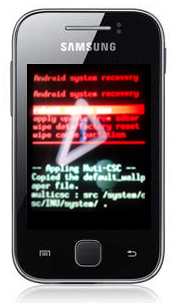
1. Masuk ke Recovery Mode, yaitu dengan menekan tombol Volume UpPower Button dan Home Button secara bersamaan.
>> terus tekan sampai muncul gambar seperti ini:
>> Ada pilihan,
  • reboot system now
  • apply update from sdcard
  • wipe data/factory reset
  • wipe cache partition
>> Tombol yang digunakan,
  • Volume Down = untuk menggerakkan ke bawah.
  • Volume Up = untuk menggerakkan ke atas.
  • Home Button = untuk memilih menu (OK).
  • Back Key = untuk kembali.
2. Pilih menu wipe data/factory reset, dengan cara menekan tombol Volume Down, kemudian tekan Home Button. Kemudian pilih Yes — delete all …
3. Terakhir pilih menu reboot system now .

Setelah langkah diatas selesai dan succes kita lanjut ke langkah berikut wew

*Instal CWM <ClockWordMod>

1.  Download file untuk program CWM Disini. http://www.mediafire.com/?pxabutfybd76t6w
untuk CWM saya coba ini http://dl.dropbox.com/u/58284539/CWM_bla_bla.zip dan mantabs 
2.  Letakkan file tersebut di SD Card.Ingat ! . Jangan diletakkan di dalam folder.
3.  Masuk ke Recovery Mode
Ingat ya. Ikuti langkah untuk masuk ke recovery mode saja !!
4.  Pilih Update from SD Card.
5.  Pilih file yang sudah di download tadi

Nah setelah isntal CWM kini saatnya pasang Custom Rom yang sobat  inginkan 

* Instal Custom Rom

Sebenarnya pada intinya instal Custom Rom ini tergantung pada Custom Rom tersebut tapi kebanyakan sekarang sudah memakai CWM instalnya 

1. Matikan handphonenya, kemudian nyalakan kembali ke modus recovery dengan cara menekan tombol volume up/+, tombol home, dan tombol power. Tekan bersamaan, kemudian tahan dan tunggu sampai ada tulisan Samsung Galaxy Young kemudian lepaskan.

Dilayar akan tampil seperti gambar di bawah ini:
100_0618 100_0618 

2. Pilih menu “apply update from sdcard” dan pilih file xxxxx.zip  kemudian tampilan menu recoveryClockWorkMod Recovery seperti gambar di bawah ini :

100_0619 

3. pada menu ClockworkMod Recovery kemudian kita memilih menu “install zip from sd” berikut tampilannya …

100_0620 
4. pilih menu “Repencis V3.0 pro-us” kemudian pilihan memastikan, Yes Install! biarkan proses berjalan, dan tunggu sampai ada tulisan “Instalation Complete, Enjoy!


100_0622 100_0623 

5. Setelah proses flashing selesai dan complete, menu tampilan akan kembali pada tampilan seperti di bawah ini setelah itu tekan tombol power 1 kali saja, untuk kembali ke menu awal, pada menu CWM Recovery pilih menu "do Wipe Data" dan menu "Wipe Cache Partition" kemudian pilih menu “Reboot system now

Baca Selengkapnya ....
Trik SEO Terbaru support Online Shop Baju Wanita - Original design by Bamz | Copyright of samsung galaxy battery.